Peer-to-Peer Networking (P2P)

Niels Olof Bouvin

Introduction to the Peer-to-Peer Networking Course

Overview

Course Overview

news://daimi.p2p
Announcements, questions, discussions, ...
http://wiki.daimi.au.dk/p2p-2006
Course plan, literature, ... (much more will be added over the course)
Course material
Papers, technical reports, and Web pages
A compendium is in production
Groups
exercises should ideally be done by groups (2-4 people)
Exam
Oral, 12 minutes, known questions, 13-scale

Purpose of course

Course Plan

Lectures
  1. Introduction to P2P (30/8)
  2. Unstructured P2P systems (6/9)
  3. Structured P2P systems (13/9)
  4. P2P applications (20/9)
  5. Security & reputation (27/9)
  6. P2P in a mobile context & Mobile Ad Hoc Networks (4/10)
  7. Grid computing (11/10)
Practical aspects
Over the course (mandatory) assignments will let you create your own basic P2P system from scratch:
  1. discovery of peers
  2. establishing overlay network
  3. searching
  4. file transfers

Administratrivia – the creation of groups

Overview

What are P2P Networking Systems?

There are a fair number of different opinions:

A Brief History of P2P Computing

1969-1995: The original Peer-to-Peer Internet
  • No firewalls, computers connected directly to the 'net, most services widely available
  • Usenet: based on Unix-to-Unix-CoPy (UUCP) originally, decentralized model of control
  • DNS: hosts are clients and servers, cache replies
1995-2001: The Internet explosion (and implosion)
  • Movement away from peer-to-peer to client-server models
  • Web, firewalls, ADSL, asymmetric connections, NAT, ...
2001-...: New wave of peer-to-peer(?)
  • separating authoring from publishing
  • (Web) service oriented Internet

Overview

Client/Server – Advantages

Client/Server – Disadvantages

Peer to Peer – Advantages

Peer to Peer – Disadvantages

Overview

Terms in P2P

Overlay network
The arrangement of peers on top of an existing “real” network. The organization of the overlay network is essential for a good performing P2P system
Servent
Server and client
Churn
The (often high) rate of peers entering and leaving a P2P network
Power-law distribution
Distribution, where few peers are very well-connected, and the rest less so

Peer to Peer – Challenges

Classes of P2P Architectures

Purely decentralized architectures
All peers have the same basic capabilities and offer similar services
Partially centralized architectures
Some, usually more powerful, peers will accept more demanding roles on an ad hoc basis
Hybrid decentralized architectures
Some central servers facilitate coordination

Degrees of P2P Structure

Unstructured networks
Peers connect in a more or less haphazardly way – resulting in a network graph either power-law or random. Routing/searching is ad-hoc or heuristic
Semi-structured networks
While the network is still relatively random, resources are placed so that greedy routing works
Structured networks
Peers and resources are placed according to a rigidly defined schema, which is maintained over the lifetime of the network

P2P Characteristics (1)

Scalability
The ability of a system to support an increasing use

Pro: Network, storage, computational power of peers may be leveraged

Con: Routing, location, synchronizing may not scale; “fat” clients needed

Performance
The time it takes for a system to react to a stimulus

Pro: Data and computation may be close to peers, high degree of distribution

Con: Replicated, distributed state and computation; complex architectures

P2P Characteristics (2)

Availability
The part of the deployment period during which a system can deliver the services it implements

Pro: No single point of failure/robustness; system may be self-configuring, replicated, autonomous

Con: Ensuring consistent availability; having knowledge of network state

Fairness
Distributing work equally across the peers according to their needs and abilities

Pro: Necessary in order to maintain the good performance of P2P

Con: Difficult to ensure

P2P Characteristics (3)

Integrity and authenticity
The ability of a system to maintain correct state

Pro: Replication, no Single Point of Failure

Con: Cryptographic security difficult to establish without central authority

Security
The degree to which a system can withstand attacks

Pro: Robustness against Denial of Service attacks; anonymity

Con: Complex, decentralized security architecture

P2P Characteristics (4)

Anonymity, deniability, censorship resistance
Being able to retrieve or publish information without risk of discovery

Pro: Adds security, difficult to suppress information

Con: Not easy to ensure, what if running the system becomes a crime? Should all information be available?

Overview

Typical P2P Applications

P2P Content Sharing

Rationale
Users want to share information. The bandwidth/storage of users' computers are often partly unused
Examples
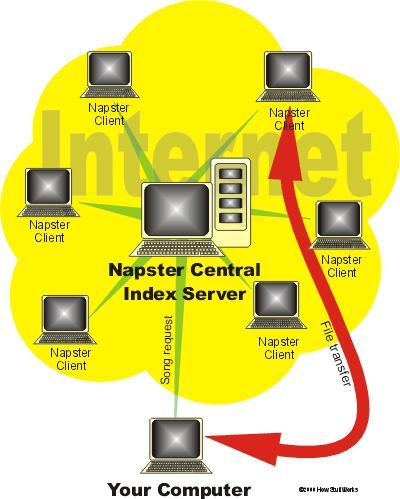
Napster
  • MP3 file sharing and searching service
  • Started in 1999, bankrupt June 2002, later restarted with revised business model
  • Hybrid P2P solution: Files on peers, metadata on server
Gnutella
The original “proper” P2P application for file sharing

Napster...

P2P Content Distribution

Rationale
A secure way of distributing content – focus on creating a “fabric” for distribution
Examples
Freenet
  • Goal: Anonymous information distribution, censor resistance
  • Completely decentralized P2P solution
  • Routing based on key “closeness” to target; routing replicates data
PAST
  • Goal: A large scale storage system based on a structured P2P network
  • High degree of availability and security

P2P Communication

Rationale
Communication is essential in collaboration and communication need only be between peers
Examples
ICQ (and many others)
  • Pioneered instant messages in 1996
  • ICQ server maps from ICQ-specific addresses to IP addresses; communication is peer-to-peer
Skype
  • Voice over IP based on P2P routing
  • Instant messaging

P2P Collaboration

Rationale
Human collaboration is intrinsically peer-to-peer, reflect this in software architectures
Examples
Groove
  • Commercial peer platform for hosting peer-to-peer applications and business solutions
  • Very elaborate security model
  • Based on publish/subscribe in which events can be cached
Distributed Knight
  • Peer-to-peer collaboration on Unified Modeling Language (UML) diagrams
  • Tight integration with context-aware instant messaging system

P2P for Distributed Computation

Rationale
Powerful desktop machines most often underutilized
Typical model:
  • central server divides “embarrassingly parallelisable” problem into manageable chunks and distributes these to clients which perform computations and return results
  • in principle similar to clusters, such as Beowulf
True P2P?
  • sort of... most projects are strictly hierarchical in architecture
  • certainly fits “deployable in an ad-hoc fashion, without requiring centralised management or control”

P2P for Distributed Computation (2)

Advantages
  • scales well for the right kind of problem
  • supercomputing for a low, low price
  • as peers need not communicate with each other, peers only need to be online when receiving work or sending results - thus even modem users can participate
Disadvantages
  • far from all computational problems can be parallelised to the necessary degree
  • project must generate sufficient “buzz” in order to get people to donate clock cycles

SETI@Home – looking for little green men

Largest (distributed) computation project ever
Problem: To identify radio signals from alien civilisations
this requires extensive filtering of radio signals, which is very computational expensive due to the large amount of data
Solution
Get people to donate their spare clock cycles to the project by running screen savers and background processes
Some statistics: (from 2004)
  • current #users: 4.670.336
  • current performance: 104.73 TeraFLOPS (NEC Earth-Simulator peak performance: 40.96 TeraFLOPS)

SETI@Home – experiences

A huge success!
  • the very success of the system has led to problems coping with the large number of clients
  • still no alien civilisations...
Problems
  • the prestige of having a high ranking makes it attractive to cheat the system by faking results. Others deliberately corrupt results to mislead the system.
  • SETI@Home uses cryptographic methods (and closed source) to combat this behaviour. To ensure data integrity, all work units are processed repeatedly by different clients

Some other distributed computation projects

distributed.net
has led a number of projects to break various encryption methods by brute force and solving mathematical problems
Folding@Home
simulates protein folding (a hard problem) using distributed computation
BOINC – Berkeley Open Infrastructure for Network Computing
next generation system for SETI@Home and other distributed computation problems
The Grid
Middleware infrastructure, tools, and applications concerned with integrating geographically distributed computational resources

Overview

Gnutella

Gnutella protocol – 5 commands are all you need

Ping
used for discovery
Pong
the response to a Ping
Query
used for searching
QueryHit
the response to a successful query
Push
used to get firewalled servents to reach outside the firewall

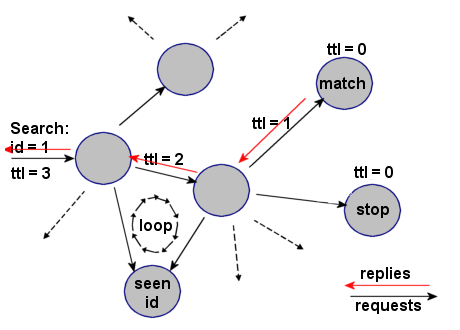
How does it work?

How does it work?

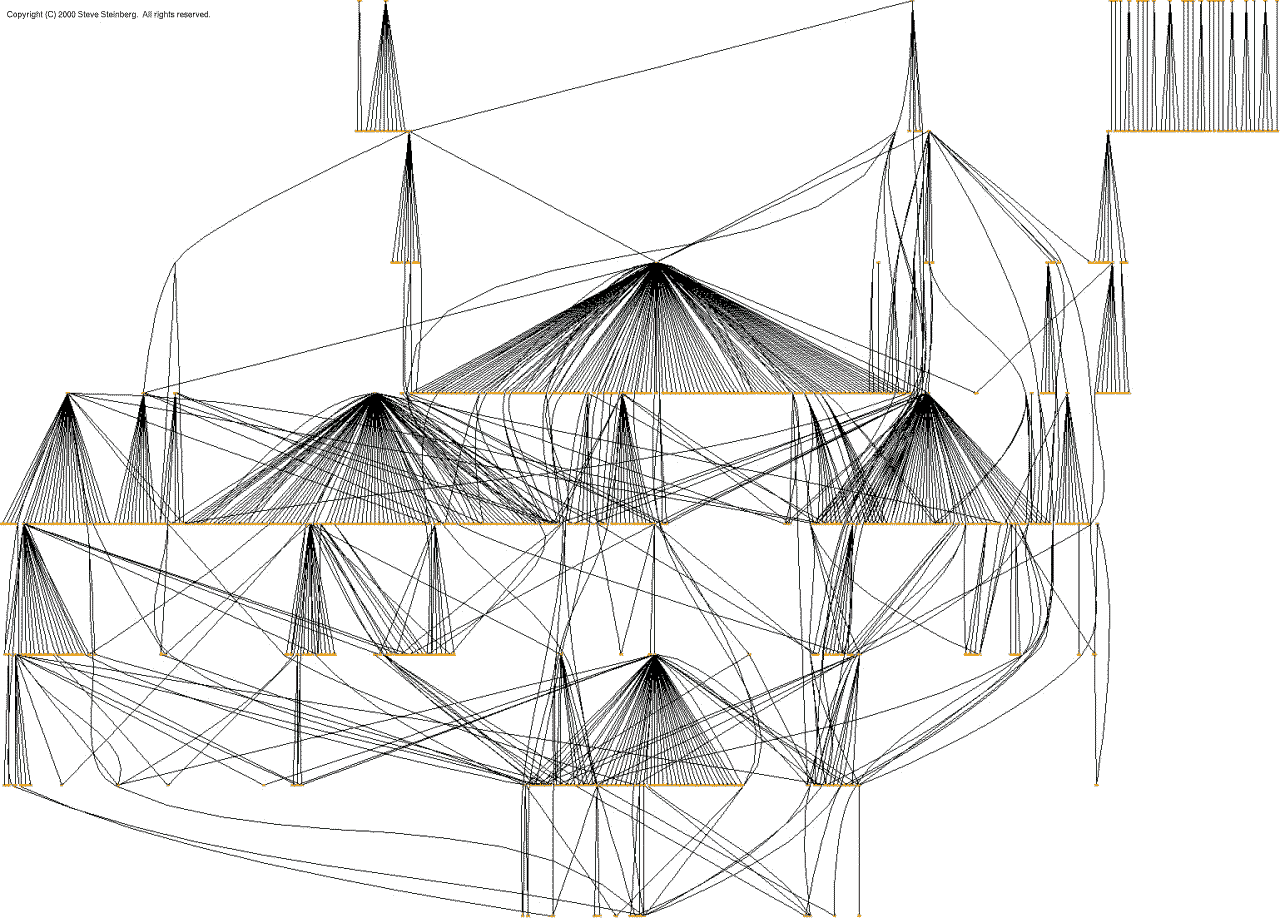
A Gnutella Network Graph

Ranking of Gnutella peers

Peers report
  • amount of shared data
  • available bandwidth
Self-reporting is problematic
  • claim your bandwidth is low, and you will be left alone

Gnutella is inefficient

Calculating Gnutella

Reachable Users
T=1 T=2 T=3 T=4 T=5 T=6 T=7 T=8
N=2 246 81012 1416
N=3 3921 4593189 381765
N=4 41652 1604841,456 4,37213,120
N=5 525105 4251,7056,825 27,305109,225
N=6 636186 9364,68623,436 117,186585,936
N=7 749301 1,81310,88565,317 391,9092,351,461
N=8 864456 3,20022,408156,864 1,098,0567,686,400

Raising N (number of connections open) and T (number of hops) extend the number of reachable users geometrically.

Assuming balanced & equally distributed network graph

From Ritter 2001

Calculating Gnutella

Bandwidth Generated in Bytes (S=83)
T=1 T=2 T=3 T=4 T=5 T=6 T=7 T=8
N=2 166332498 664830996 1,1621,328
N=3 2497471,743 3,7357,71915,687 31,62363,495
N=4 3321,3284,316 13,28040,172120,848 362,8761,088,960
N=5 4152,0758,715 35,275141,515566,475 2,266,3159,065,675
N=6 4982,98815,438 77,688388,9381,945,188 9,726,43848,632,688
N=7 5814,06724,983 150,479903,4555,421,311 32,528,447195,171,263
N=8 6645,31237,848 265,6001,859,86413,019,712 91,138,648637,971,200

Assuming balanced & equally distributed network graph

From Ritter 2001

Calculating Gnutella

Bandwidth Incurred in Bytes (S=83)
T=1 T=2 T=3 T=4 T=5 T=6 T=7 T=8
N=2 332664996 1,3281,6601,992 2,3242,656
N=3 4981,4943,486 7,47015,43831,374 63,246126,990
N=4 6642,6568,632 26,56080,344241,696 725,7522,177,920
N=5 8304,15017,430 70,550283,0301,132,950 4,532,63018,131,350
N=6 9965,97630,876 155,376777,8763,890,376 19,452,87697,265,376
N=7 1,1628,13449,966 300,9581,806,91010,842,622 65,056,894390,342,526
N=8 1,32810,62475,696 531,2003,719,72826,039,424 182,277,2961,275,942,400

Searching for 'grateful dead live' generates a lot of traffic, when N and T grows. These calculations only consider search – not the cost of actual file transfers.

Assuming balanced & equally distributed network graph

From Ritter 2001

Experiences

Overview

Week 2: Unstructured P2P Networks

Week 3: Structured P2P Networks

Week 4: P2P Applications

Week 5: Security and Reputation

Week 6: Mobile P2P – Mobile Ad Hoc Networks

Week 7: The Grid

Summary

The strength of P2P is in numbers
  • Great number of unused processors
  • Great number of unused bandwidth
By leveraging these strengths, P2P systems can be built to increase
  • Computing power
  • Data availability
  • Free speech
This involves significant challenges
  • Routing
  • Churn
  • Security

Overview

Exercise 1 – Basic discovery

Construct a peer, that can discover and list other peers. In essence, implement functionality similar to 'ping' and 'pong' from Gnutella. However, you are free/encouraged to create your own (extensible) protocol.

Each peer should publish a “quality value”, adjustable upon launch, signifying its strength.

The program must be interactive (though a GUI is certainly not necessary), and should run on Linux. You are free to use any programming language available. However, your program must require no more setup than “untar; make; make test” or similar.

Accompany the prototype with source and a short report (2-3 pages) detailing your assumptions (e.g. does your system work across subnets/firewall etc), protocol, design choices, and usage instructions.

Include information about all group members: Full name, user name, and student ID.

The exercise is mandatory and on a group basis.

Due 18:00 6/9/2006 by email to <n.o.bouvin@daimi.au.dk>